
English
Calls become threads
In short. A summary of one call is read once and forgotten. What I actually need before the next call is the thread: the client I have spoken to four times since July, what we agreed each time and what is still open. So the unit here is a thread note, and its chronology has one line per call. A page draws the timeline straight from those lines, so there is nothing to keep in sync. An agent proposes who spoke, what the topics were and which thread a call belongs to. I check its guesses on a screen made for checking, not by answering questions in a messenger. My corrections go into a separate note that the page owns. Both pages are layouts anyone can install: Calls dashboard, with demos on invented data.
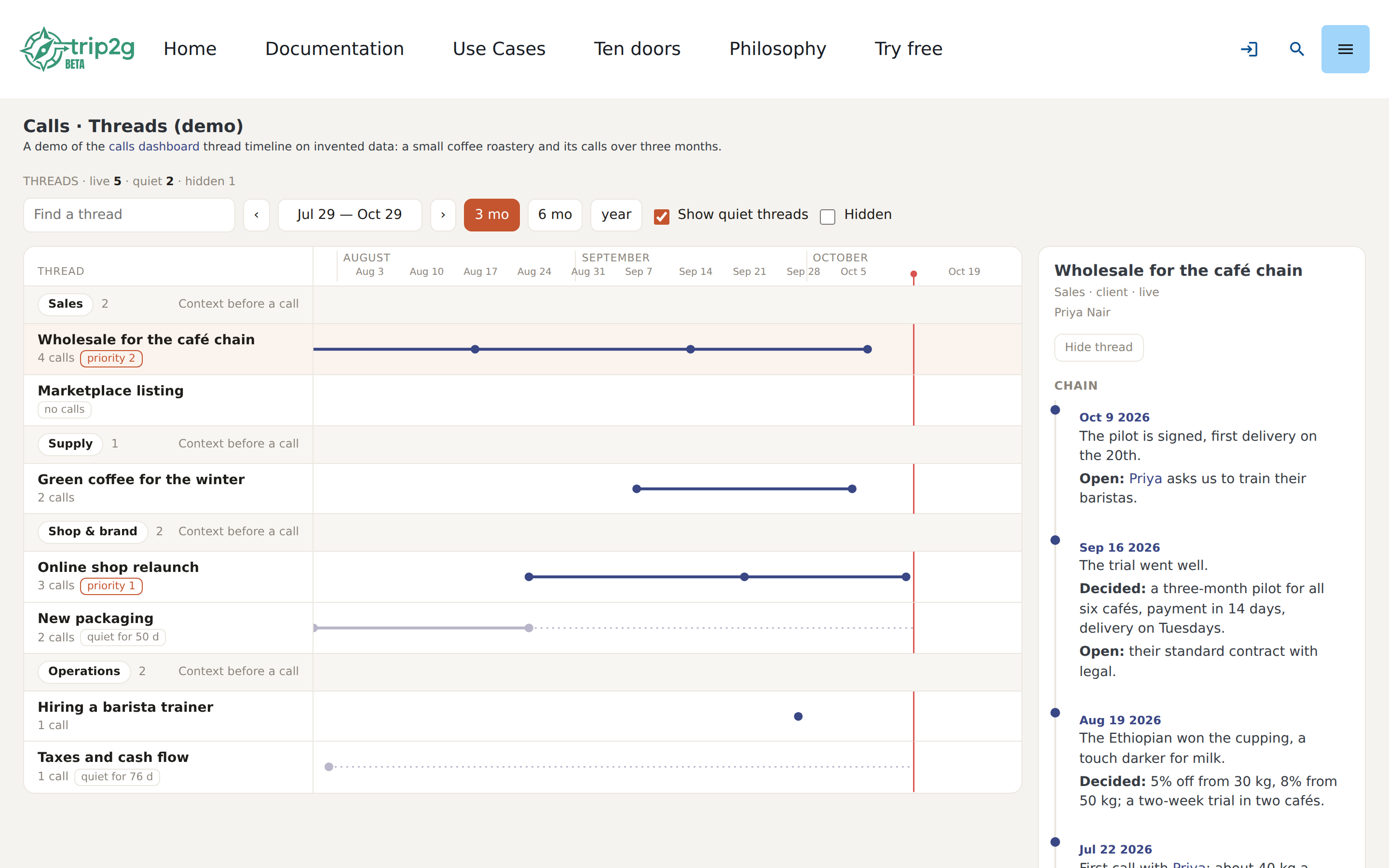
A call is a dot, not a document
Most call tools give you a page per call: a transcript, a summary, maybe action items. That is the shape the recorder sees. It is not the shape of the work. The supplier I talk to in October is the same supplier from September, and the October call only makes sense next to the September one: in September he held two lots until October 1, in October I confirmed late and got one.
So I stopped treating the call as the thing to file. A call is an event on a thread, and the thread is the thing I keep. A thread has a group (sales, supply, operations), a status (live, paused, done, dead end), people, and a chronology:
## Chronology

- [[calls/a9d4e7|2026-09-09]]: Tom holds two Ethiopian lots
  until October 1. Open: confirm by the 1st.
- [[calls/e3b6c2|2026-10-07]]: Confirmed late: one lot is ours.
  Decided: 30% prepayment this week.
One line, one call. The line starts with a link to the call, and the link's label is the date. A line without a call link is also allowed, for a letter or a decision made in a corridor; it stays in the chain but does not become a dot.
The timeline is the note
The threads page reads every thread note, finds the chronology list, and puts a dot on the timeline for each line that links to a call. That is the whole data model. There is no database of calls and threads behind the page, and no second place where "this call belongs to that thread" is written down.
I tried the other way first, in my head at least: a table of call-to-thread links, and the thread note generated from it. It falls apart on the first correction. If I fix a line in the note, the table is wrong; if I fix the table, the note is stale until something regenerates it. With the chronology as the only record, an agent that adds a line, me editing it in Obsidian, and the page drawing it all look at the same text.
The format has to be strict for that to work: the date in the link label, one call per line, people as links. That is a fair price. The page tolerates the rest: Decided: and Open: inside a line start new lines in the side panel, and whatever is under the open items heading shows as "still open".
A thread that had no call for three weeks turns grey and gets a dotted line up to today. That is the most useful thing on the page. It shows, without anyone writing a report, which conversations I let drop. The packaging redesign in the demo has been quiet for fifty days; the page says so before I have to remember it.
The agent proposes, the person checks
trip2g does not record, transcribe or review calls. Something else writes the transcript, the review and the topic map: a recorder that saves into the vault, a script, or an agent with an API key. The two layouts only read those notes. What they write is the edits note of a call, the hidden key of a thread, and a person note when I add someone new.
In my case an agent does that first pass: who spoke, what about, which thread. Two rules came out of getting it wrong.
Speakers only when the conversation shows it. Recorders name speakers from the calendar, and the calendar is often wrong. In my case the recording machine's clock was set to one timezone and the calendar lived in another, so the recorder attached the event an hour away and confidently put the wrong person's name on a speaker. The demo keeps one such call, where the supplier got the accountant's name: the label says "Marcus Hale", and the first line of the transcript is "Tom, sorry, I'm late with the confirmation". So the agent maps a label to a person only when someone introduces themselves, is addressed by name, or it is plainly the next call of a known thread. Otherwise it writes ? and leaves it to me.
Everything guessed is marked as a guess. A review written without me carries assumed: true. The page counts such calls as "waiting for your check" until I have confirmed four things: speakers, category, threads and topics.
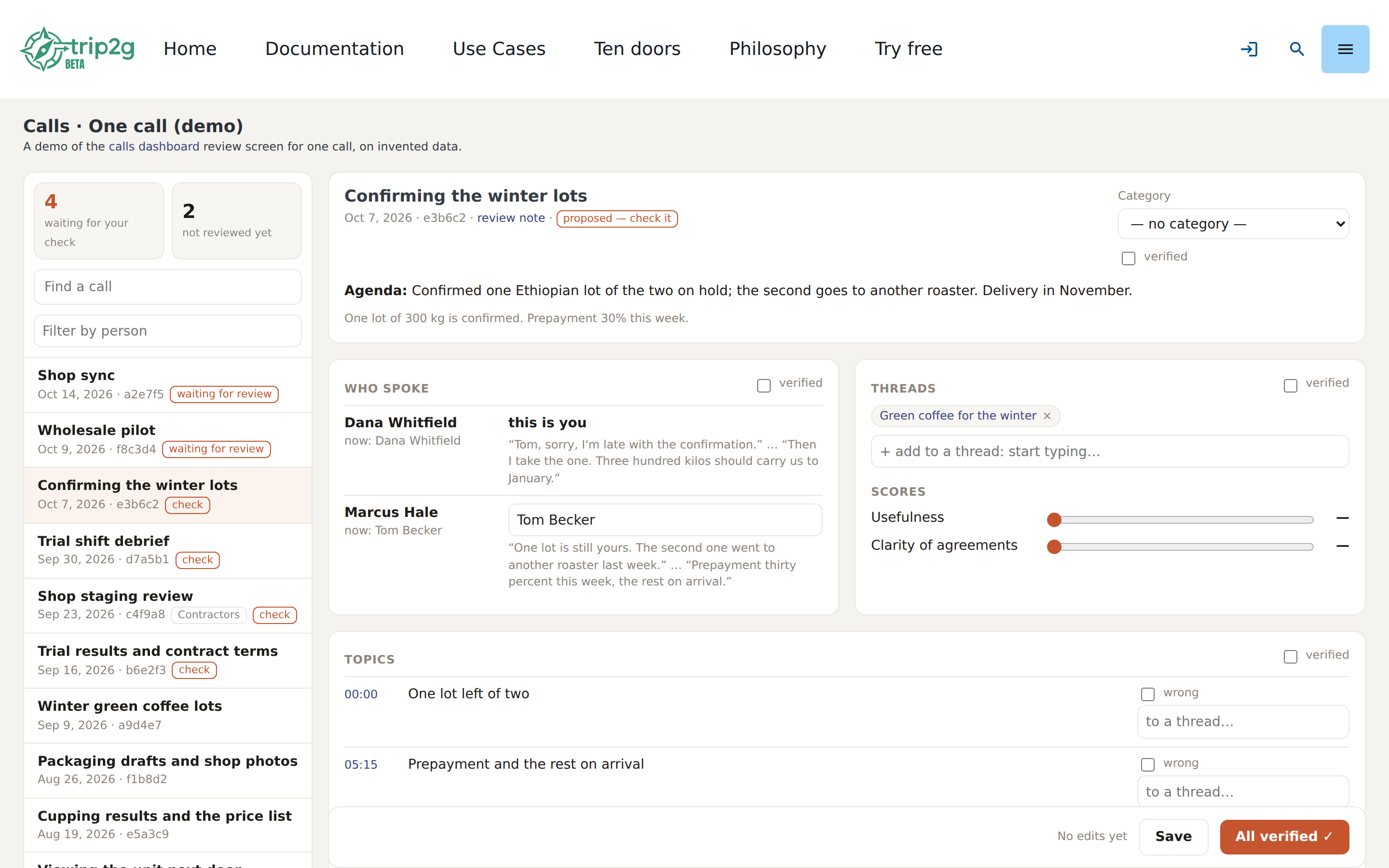
I used to answer these questions in a chat with the agent: "who is Speaker 2 on the call from Tuesday?" It works for one call. It does not work for ten, and it puts the burden on the wrong side: I have to remember which call, open the transcript, type a name the agent then has to match to a note. On a screen the call is already open, the transcript is next to the question, each speaker shows two of their own quotes, and the name is a searchable list of the people I already have. Picking is faster than typing, and a new person is one click that creates their note.
Each block has its own verified box, and All verified ticks the four at once and moves to the next call that waits. The counter at the top goes down. That is the review: not a form to fill, a queue to empty.
Priority and hiding are mine
Some fields only the owner sets. priority pins a thread to the top of its group; hidden: true takes a thread off the board without deleting it. If an agent keeps the thread notes, its instructions should say: keep priority and hidden as they are, never add them. The hide button writes that one key into the thread's frontmatter and leaves the rest of the note alone, so it cannot collide with the agent's last edit to the chronology.
Why the corrections live in their own note
The page could write my corrections straight into the review note. It does not: it writes call_edits/<id>.md, one note per call, and nothing else.
The review belongs to whoever wrote it, usually the agent. If the page edited it too, two writers would share one file, and every save would be a possible conflict with the agent's next pass. With a separate note each writer has its own file. The page reads the review as input and never changes it.
The edits note is a contract in its frontmatter: speakers maps a label to a person note, threads lists the threads I picked, topics_wrong the topics I struck out, extra_topics the ones that were missed, then scores, outcome and verified. The full list is on the settings page, and the demo carries one such note. Whatever writes the reviews can read it on its next pass. That reader is yours to build.
There is a second reason. The edits note is a record of what a person decided, separate from what a model guessed. When the agent's prompt changes, I can compare its new guesses with my old answers. If my answers were mixed into its output, I could not.
The page saves a second after the last change, and checks the note's hash before writing, so an edit made in Obsidian in the meantime is refused instead of overwritten.
What is still open
- Nothing moves a call into a thread by itself. The page shows the threads that already link to a call and saves the ones I pick into the edits note. Writing the chronology line is still the job of whoever keeps the thread notes, in my case the agent on its next pass. A button that appends the line directly would be convenient, and it would make the page a second writer of the thread notes, which is the thing the separate edits note exists to avoid.
- The page loads everything. Every review, thread and topic map goes into the HTML. That is fine for a few hundred calls and will not be for a few thousand.
- The checks are binary. "Verified" says I looked, not how sure I am. So far that has been enough.
- The interface is configured by hand. Every label on the page can be translated in the page note's frontmatter, and the Russian demo carries the full list. It is long. A shared dictionary would be shorter, and one more thing to install.
The layouts are in the repository under docs/_layouts/calls/, and the Calls dashboard page lists every setting. The demos, threads and one call, run on a coffee roastery that does not exist.