
English
Frontmatter Patches
You have 200 notes in blog/ and every one needs free: true. Or you want all notes in docs/ served from docs.mysite.com. Editing them by hand is pointless — write one rule and it applies to the whole folder.
A frontmatter patch works like this: you specify a path pattern and an expression that adds or changes note properties. The system applies the patch at load time, before rendering. Your notes stay clean — their frontmatter is never modified on disk.
How this documentation site is configured
The trip2g docs you are reading use frontmatter patches stored as ordinary notes in the patches/ folder:
| Patch file | Pattern | What it does |
|---|---|---|
| lang-en.md | **/*.md (priority −1) |
Sets English as the default language for the whole site |
| free.md | **/*.md |
Makes every page public (free: true) |
| ru.md | ru/**/*.md |
Sets lang: ru, header, and footer for the Russian section |
| en-user-sidebar.md | en/user/**/*.md |
Attaches the sidebar to all English user docs |
| ru-user-sidebar.md | ru/user/**/*.md |
Attaches the sidebar to all Russian user docs |
| en-thoughts-sidebar.md | en/thoughts/**/*.md |
Attaches the English essays sidebar |
| ru-thoughts-sidebar.md | ru/thoughts/**/*.md |
Attaches the Russian essays sidebar |
| dev-no-search.md | dev/**/*.md |
Keeps dev notes out of site search |
| related.md | thoughts + user (priority 10) | Adds backlinks, related notes, and table of contents |
The language cascade is worth noting: lang-en.md sets lang: "en" at priority −1 for everything. ru.md sets lang: "ru" at priority 0 for ru/** — overriding only what it needs to. No note needs lang in its own frontmatter.
The default template reads lang, left_sidebar, header, and footer from the note's properties. Patches inject those properties at load time without touching the source files.
Who needs this
- You have a free section and a paid section, and setting
freeon every note manually is tedious - You want to assign a layout to a whole folder instead of each note individually
- You need to attach a subdomain to a section via custom routes
Creating a patch
Create an ordinary markdown file anywhere in your vault. Give it type: frontmatter-patch in its frontmatter along with the patterns you want to match. Write the Jsonnet expression in a fenced code block in the body.
Example — make every note in blog/ free:
---
type: frontmatter-patch
include:
  - blog/*
---

All notes in blog/ are public.

```jsonnet
{ free: true }
```
Sync your vault and the patch takes effect immediately.
Frontmatter fields
| Field | Required | Default | Description |
|---|---|---|---|
type |
yes | — | Must be "frontmatter-patch" |
include |
yes | — | Glob patterns for notes to match |
exclude |
no | [] |
Glob patterns for notes to skip |
priority |
no | 0 |
Lower numbers apply first (within vault patches) |
There is no enabled field. To disable a patch, delete or rename the file.
Visibility of the patch file
Files with a _ prefix — such as _rules.md or _publish-rules.md — are hidden from the published site but still work as patches. Files without the prefix appear as regular notes on the site and also work as patches. This lets you write the patch description in plain prose, link to it from other notes, and keep it visible as documentation.
Multiple patches in one file
Each fenced jsonnet block in the body becomes a separate patch. All blocks in a single file share the same include, exclude, and priority from the frontmatter:
---
type: frontmatter-patch
include:
  - docs/**
priority: 5
---

```jsonnet
{ layout: "doc" }
```

```jsonnet
{ free: true }
```
This creates two patches, both with priority: 5 and include: ["docs/**"].
Errors in a patch file
If a patch file has problems, the site keeps working. The note displays a warning so you can see and fix the issue.
| Situation | What happens |
|---|---|
| No jsonnet block in the body | Warning on the note; file still renders normally |
include patterns missing |
Warning on the note |
| Invalid glob pattern | Warning on the note |
| Invalid Jsonnet syntax | Warning on the note |
The warning appears when you open the note in the published site. Other patches continue to apply normally.
Examples
Assign a layout to a section:
---
type: frontmatter-patch
include: ["blog/*"]
---

```jsonnet
{ layout: "blog_layout" }
```
All notes in blog/ use the blog_layout template. Notes outside it keep whatever layout their frontmatter specifies.
Attach a folder to a subdomain:
---
type: frontmatter-patch
include: ["docs/**"]
---

```jsonnet
{ route: "docs.mysite.com" }
```
All notes in docs/ and subfolders automatically appear at docs.mysite.com. See multi-domains for more on routes.
Add a suffix to titles:
---
type: frontmatter-patch
include: ["*"]
---

```jsonnet
meta + { title: meta.title + " — My Site" }
```
meta contains the note's current properties. The expression takes the existing title and appends the site name.
Conditional patch — set a layout only if not already set:
---
type: frontmatter-patch
include: ["*"]
---

```jsonnet
if std.objectHas(meta, "layout") then {} else { layout: "default" }
```
If the note already has a layout, the patch does nothing. Otherwise it sets default.
Priorities and chains
Patches apply in order: lower priority number first, then higher. Each patch sees the result of the previous ones.
| Priority | Pattern | Expression |
|---|---|---|
| 0 | * |
{ layout: "default" } |
| 10 | blog/* |
{ layout: "blog_layout" } |
For blog/post.md: rule 0 sets layout: "default", then rule 10 overwrites it with blog_layout. All other notes keep default.
Patch or note: which wins
The patch wins. trip2g starts from the note's own frontmatter and applies every matching patch on top. Each key the expression returns replaces the note's value; keys it doesn't return stay as they are.
A note ru/user/intro.md with lang: en and a patch for ru/**/*.md with { lang: "ru" } ends up with lang: "ru". Priority doesn't change this: it only orders patches among themselves; the note's frontmatter always comes first.
To make a patch a default that a note can override, check the key first:
if std.objectHas(meta, "left_sidebar") then {} else { left_sidebar: "ru/user/_sidebar.md" }
Now a note with its own left_sidebar keeps it. meta also contains values from earlier patches, so the check skips the key if a lower-priority patch has already set it.
The other way is to take the note out of the patch with exclude:
include: ["ru/user/**/*.md"]
exclude: ["ru/user/landing.md"]
Common scenarios
One sidebar for every page in a folder. This site does exactly that (patches/ru-user-sidebar.md):
---
type: frontmatter-patch
include: ["ru/user/**/*.md"]
---

```jsonnet
{ left_sidebar: "ru/user/_sidebar.md" }
```
ru/user/**/*.md matches notes in subfolders too, but not ru/user.md next to the folder.
Turn off previous/next links and breadcrumbs for a folder. The default template builds them from the sidebar; for a blog you may not want them:
---
type: frontmatter-patch
include: ["blog/**/*.md"]
---

```jsonnet
{ prev: false, next: false, breadcrumbs: false }
```
Make every note public, except one folder:
---
type: frontmatter-patch
include: ["**/*.md"]
exclude: ["members/**/*.md"]
---

```jsonnet
{ free: true }
```
Default language with a section override. The weakest patch sets the language everywhere, a stronger one fixes the ru/ section:
| Priority | Include | Expression |
|---|---|---|
| −1 | **/*.md |
{ lang: "en" } |
| 0 | ru/**/*.md |
{ lang: "ru" } |
Both overwrite lang that a note sets itself. If some notes set their language by hand, use the std.objectHas check from the previous section.
Full-width pages for a folder of boards:
---
type: frontmatter-patch
include: ["boards/**/*.md"]
---

```jsonnet
{ wide: true }
```
Keep a folder out of site search (patches/dev-no-search.md on this site):
---
type: frontmatter-patch
include: ["dev/**/*.md"]
---

```jsonnet
{ search: false }
```
Patterns
Patterns determine which notes a patch applies to. The syntax is similar to .gitignore with a few specifics.
Special characters:
| Symbol | What it matches |
|---|---|
* |
Any characters except /. Does not match hidden files (starting with .) |
** |
Any number of nested folders, including zero |
? |
Exactly one character, except / |
[abc] |
One character from the set: a, b, or c |
[a-z] |
One character from the range |
[^abc] or [!abc] |
Any character except those listed |
{foo,bar} |
One of the alternatives: foo or bar |
Examples:
| Pattern | Matches | Does not match |
|---|---|---|
blog/* |
blog/post.md, blog/draft.md |
blog/2024/post.md (nested folder) |
blog/** |
blog/post.md, blog/2024/jan/post.md |
docs/post.md |
blog/**/draft* |
blog/draft1.md, blog/2024/drafts/draft-new.md |
blog/final.md |
* |
index.md, about.md |
.hidden.md, blog/post.md |
*.md |
about.md, index.md |
.secret.md |
.* |
.hidden.md, .config.md |
about.md |
blog/post-?.md |
blog/post-1.md, blog/post-a.md |
blog/post-12.md |
{blog,docs}/* |
blog/post.md, docs/api.md |
notes/post.md |
blog/[0-9]* |
blog/2024-review.md |
blog/my-post.md |
Things to know:
** only works between path separators. blog/**/*.md matches all .md files at any depth inside blog/. blog/**.md behaves like blog/*.md — first level only. Use blog/**/*.md when you need recursion.
Hidden files (starting with a dot) are not matched by * or ?. Use an explicit pattern .* or a concrete name .config to match them.
Empty alternatives in braces work as optional parts: some{thing,} matches both something and some.
Include and exclude: each patch has include patterns (what to match) and exclude patterns (what to skip). A note is patched if it matches at least one include and no exclude patterns.
include: ["blog/**"]
exclude: ["blog/drafts/*"]
This patch applies to all notes in blog/ except those in blog/drafts/.
Expressions (Jsonnet)
Expressions are written in Jsonnet — a language that extends JSON with variables, conditions, and functions. Simple cases look like plain JSON.
Available variables:
| Variable | Type | Contents |
|---|---|---|
meta |
object | Current note properties (after previous patches in the chain) |
path |
string | File path, e.g. "blog/my-post.md" |
The expression must return an object {}. Its contents are merged into the note properties. Existing keys are overwritten.
Simple object — the most common case:
{ free: true, layout: "blog" }
Reading current properties with meta:
meta + { title: meta.title + " — My Site" }
The + operator for objects works as a merge: takes all fields from meta and overwrites title with the new value.
Conditionals with if / then / else:
if std.objectHas(meta, "layout") then {} else { layout: "default" }
std.objectHas checks whether the note has a layout field. If it does, the patch returns an empty object (changes nothing). If it doesn't, sets default. Without the check, meta.layout would fail on any note that doesn't have that field.
Path-based logic:
if std.startsWith(path, "premium/")
then { free: false }
else {}
This is achievable with patterns too (["premium/*"]), but sometimes a condition in the expression is cleaner.
String concatenation with +:
{ description: meta.title + " — published at " + meta.site_name }
String formatting with % (Python-style):
{ og_title: "%s | %s" % [meta.title, "My Site"] }
Useful standard library functions:
| Function | What it does | Example |
|---|---|---|
std.objectHas(obj, key) |
Check whether a field exists | std.objectHas(meta, "layout") |
std.length(x) |
Length of string or array | std.length(meta.title) > 50 |
std.startsWith(str, prefix) |
Does string start with prefix | std.startsWith(path, "blog/") |
std.endsWith(str, suffix) |
Does string end with suffix | std.endsWith(path, ".draft.md") |
std.split(str, delim) |
Split a string | std.split(path, "/") |
std.join(delim, arr) |
Join an array | std.join(", ", meta.tags) |
Composite example — a premium section with a default complexity level:
meta + {
  free: false,
  reading_complexity:
    if std.objectHas(meta, "reading_complexity")
    then meta.reading_complexity
    else "advanced"
}
The patch closes access to notes (free: false) and sets reading_complexity: "advanced" only when the author hasn't set it manually.
Return an empty object {} when the patch should change nothing — useful in one branch of a conditional.
Patches in the admin panel
You can also create patches in the admin panel under Notes & Content. Each patch has three fields: path patterns, a Jsonnet expression, and a priority.
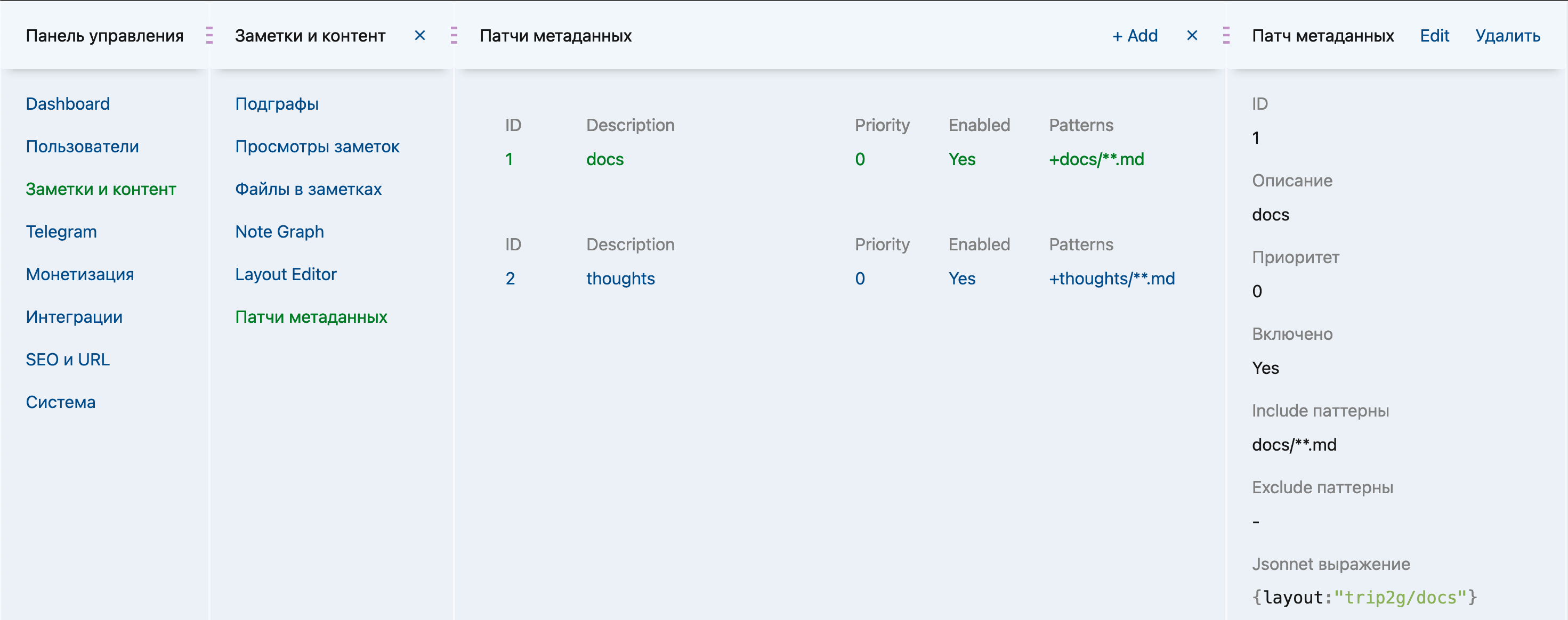
Order of application. Admin panel patches apply first, then vault patches from the vault. Within each group, patches apply in priority order — lower number first. At equal priority, vault patches are ordered alphabetically by file path (alphabetically later wins); admin patches are ordered by creation time (created later wins).
Vault patches always run after admin panel patches — even if a vault patch has a lower priority number. A vault patch can override any admin panel rule.
Troubleshooting
Patch doesn't apply — check your pattern: blog/* won't match blog/drafts/post.md. Use blog/** for nested folders.
Expression error — if the expression fails for a specific note (e.g., accessing a missing field), the patch is skipped only for that note. Other notes process normally; the site keeps working.
Two vault patches conflict — the one with higher priority (larger number) wins. At equal priority, the alphabetically later file path wins.
A vault patch and an admin patch conflict — the vault patch always runs last and overrides the admin patch, regardless of priority.
Forgot about ordering — a patch with priority 10 sees meta after all patches with priority 0–9. If you add a suffix to title in a high-priority patch, it picks up the already-modified title.
Accessing a missing field — meta.tags fails if the note has no tags. Wrap in a check: if std.objectHas(meta, "tags") then meta.tags else [].
Live examples on this site
This documentation site runs on its own patches. Each one is a real note you can open:
- Publish every note — marks all Markdown free
- Default language English — site-wide
lang: en - Russian section — language plus shared header and footer under
ru/ - English user-docs sidebar and Russian user-docs sidebar
- English essays sidebar and Russian essays sidebar
- Keep dev docs out of search
- Backlinks, related notes, and table of contents
Together they replace frontmatter that would otherwise be repeated across hundreds of notes.