
English
Embedded notes
Write ![[note-name]] and the target note's rendered content appears inline on the page, wrapped in <div class="embedded-note">. Add embed_class: my-class to the embedded note's frontmatter and the wrapper also gets embedded-note__my-class — a hook you can style with a few lines of CSS in the admin. That turns any note into a reusable, styled block: a callout, a promo card, a shared footer.
How to embed a note
Same syntax as Obsidian — a wikilink with ! in front:
![[pricing-table]]
The embedded note renders in full, with its own markdown, links and images. If the target doesn't exist, the embed is silently skipped and the page gets a rendering warning.
Media files use the same syntax but render as media, not as embeds: ![[photo.jpg]] becomes an <img>, ![[demo.mp4]] a video player. This page is about embedding notes.
Hidden _ notes make good partials
Notes whose file name starts with _ are hidden from listings, search and RSS — but they embed just fine:
![[_signup-banner]]
That's the pattern for reusable partials: keep the banner in one _ note, embed it on ten pages, edit it once. Details on _ hiding are in Subgraphs.
One caveat: embedding shows the content on the host page. _ hides a note from discovery, it is not access control — for that, use a subgraph.
Give an embed a custom CSS class
In the frontmatter of the note being embedded (not the host page):
---
embed_class: promo-card
---
Every place that embeds this note now renders:
<div class="embedded-note embedded-note__promo-card">
  ...note content...
</div>
The value is sanitized: any character outside a-z A-Z 0-9 _ - is replaced with _, so embed_class: "my card!" becomes embedded-note__my_card_. Stick to letters, digits and dashes.
Wrong place — this does nothing:
# frontmatter of the HOST page — has no effect on embeds
embed_class: promo-card
The class belongs to the embedded note itself. That's the point: the note carries its look everywhere it's embedded.
Style it from the admin
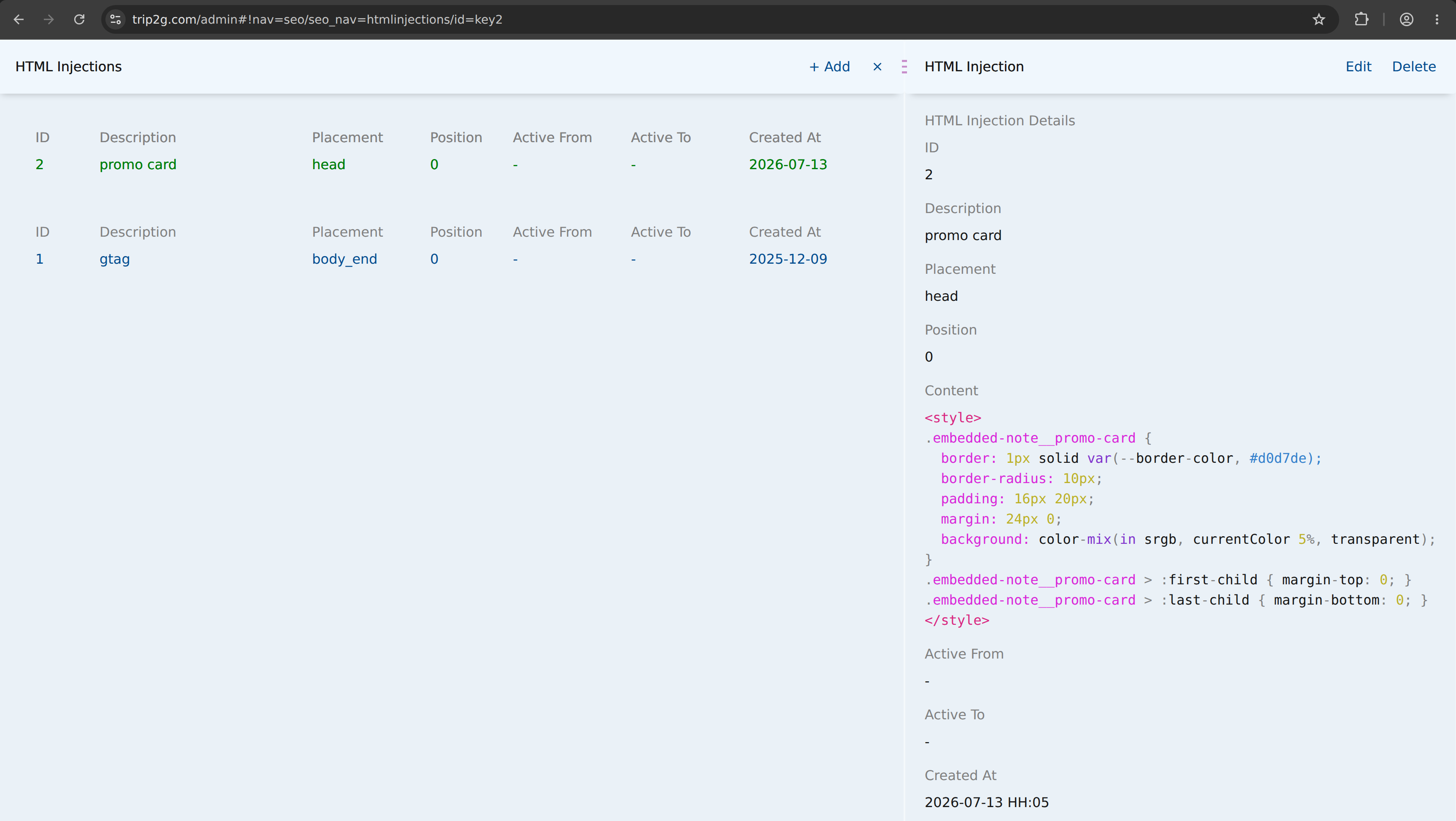
Admin → SEO & URLs → HTML Injections → + Add. Set placement to head and paste a <style> block as the content. It lands in <head> on every page — no template editing needed. The same mechanism handles fonts, colors and light theming; see Themes for the full story.
Worked example: a promo card
- Create
_promo.md:
---
embed_class: promo-card
---
**Try trip2g free** — sync your vault and get a website in 5 minutes.

[[getting-started|Start here →]]
- Embed it anywhere:
![[_promo]]
- In the admin, add an HTML Injection with placement
headand this content:
<style>
.embedded-note__promo-card {
  border: 1px solid var(--border-color, #d0d7de);
  border-radius: 10px;
  padding: 16px 20px;
  margin: 24px 0;
  background: color-mix(in srgb, currentColor 5%, transparent);
}
.embedded-note__promo-card > :first-child { margin-top: 0; }
.embedded-note__promo-card > :last-child { margin-bottom: 0; }
</style>
Here is that injection in the admin — placement head, the <style> block pasted into Content:
Every page that embeds _promo now shows a bordered card. Change the text in _promo.md — it updates everywhere. Change the CSS in the injection — the look updates everywhere.
The plain .embedded-note class (no __ suffix) is also there on every embed, so you can style all embeds at once and reserve embed_class for the special ones.